Lightroom Quick Tip #9
https://www.youtube.com/embed/F6REPwqNSrg?rel=0Subscribe Table of Contents Lightroom Quick Tip #9 Today, you’ll learn about 1 of the most often overlooked tools in Lightroom… the Lens Corrections panel.
Hi, I’m Chris… but my friends call me Parker. For over 35 years I’ve been a pro photographer, capturing sweeping landscapes and unforgettable wildlife encounters. Along the way I’ve taught hundreds of thousands of photographers worldwide how to master their craft without the overwhelm, jargon, or gimmicks that flood the industry. When I started out I had no mentors, no guidance, and no real community… …just years of trial and error that left me more frustrated than inspired. I knew exactly how I wanted my photos to look, but getting there felt impossible. That gap between vision and results lit a fire in me. It’s the reason I created PhotoMation… a place where photographers get the clarity to learn, the confidence to create, and the connection to grow. Photography education should be simple, inspiring, and results-driven… never an endless guessing game that leaves you frustrated. Today through Parker Photographic I’m here to help you close that gap once and for all… so your photos look exactly how you imagined and you never have to walk the path alone.
Every Tuesday morning, I drop a new issue in your inbox. Not a tips list. Not a gear roundup. Just a real story from the field... ...with one photography or editing lesson woven in that you can actually use the next time you pick up your camera. Oh, and every word is mine! Real shoots. Real moments. No AI. No ghostwriter. 77% of subscribers open it every week. Which, not gonna lie... I'm pretty proud of.
Create with clarity. Protect what matters. Edit with confidence.
Understand when and why to use the tools you already know.
Learn the basics without getting overwhelmed by settings and rules.
Make better decisions about light, composition, settings, and timing.
Build the confidence to trust your choices and create with intention.
Practice what you learn through: projects, live workshops, honest feedback, and a supportive community.
270,000 Photographers Taught • 37 Years Experience • 30-Day Money-Back Guarantee
Shoot with confidence with my PhotoMation system for perfect images: Every. Single. Time.
Create amazing photos with the camera you already own. Even if it's the cheapest digital camera you could find.
Creating great photos is easy and fun when you know the 4 keys for awesome photos every time.
Master composition with my 22-page e-book; stunning examples and simple steps to create visually striking images effortlessly.
Discover the C.H.E.A.D.D. and S.E.E.E. methods that show you how to see like a pro. These two field-tested frameworks are changing how photographers compose for life.
Transform your editing process with 7 powerful Lightroom presets designed to save you time and boost your creativity.
Master Lightroom Classic and discover your gateway to creative excellence, transforming your photography with ease and precision!
Master Lightroom and unlock your full creative potential to bring your photography to life like never before!
Simplify your editing with Lightroom Mobile! Learn to organize, enhance, and transform your photos anytime, anywhere.
Design your ideal Lightroom workflow with this comprehensive step-by-step guide, making your editing process seamless and efficient.
Effortlessly create custom photo collage templates directly within Lightroom Classic, perfect for showcasing your favorite images with style.
Transform lifeless skies into breathtaking, dramatic masterpieces in seconds using powerful AI presets designed for effortless editing.
Learn to create stunning light effects with step-by-step tutorials and 3 hands-on projects. Perfect for adding creativity and warmth to your photos!
Learn the essential editing tools in Photoshop with step-by-step tutorials tailored for photographers. Perfect for beginners looking to enhance their photos with confidence and ease!

https://www.youtube.com/embed/F6REPwqNSrg?rel=0Subscribe Table of Contents Lightroom Quick Tip #9 Today, you’ll learn about 1 of the most often overlooked tools in Lightroom… the Lens Corrections panel.


https://www.youtube.com/embed/27py2fu0C0o?rel=0Subscribe Table of Contents Lightroom Quick Tip #8 We’re back with another quick Lightroom tip all about the HSL panel, again. Why? Well, there’s a
https://www.youtube.com/embed/oRGLUE3bcjA?rel=0Subscribe Table of Contents Lightroom Quick Tip #7 In this Lightroom quick tip tutorial, you’ll learn all about the HSL panel, the differences between the
https://youtube.com/watch?v=fRHVj3Q-WlY%3Frel%3D0Subscribe Table of Contents Lightroom Quick Tip #6 In this Lightroom quick tip tutorial, you’ll learn more about the Tone Curve. In the last episode,
https://youtube.com/watch?v=AW1c8H17tD4%3Frel%3D0Subscribe Table of Contents Lightroom Quick Tip #5 In this Lightroom quick tip tutorial, we’re going to take a look at one of my favorite
https://youtube.com/watch?v=DCk6Uj5GHnI%3Frel%3D0Subscribe Table of Contents Lightroom Quick Tip #4 In this Lightroom quick tip tutorial, you’ll learn about the Clarity slider. Clarity is sometimes mistaken for
https://youtube.com/watch?v=UxV27-Yk7Fo%3Frel%3D0Subscribe Table of Contents Lightroom Quick Tip #3 In this Lightroom quick tip tutorial, you’ll learn the difference between Saturation and Vibrance. The best way
https://www.youtube.com/embed/pYoDVdGPbKs?rel=0Subscribe Table of Contents Lightroom Quick Tip #2 In this Lightroom quick tip tutorial, you’ll learn how to customize your interface even more (vs. the
https://youtube.com/watch?v=S1VTIiWs3g8%3Frel%3D0Subscribe Table of Contents Lightroom Quick Tip #1 In this Lightroom quick tip tutorial, you’ll learn how to add your logo to the Lightroom interface.

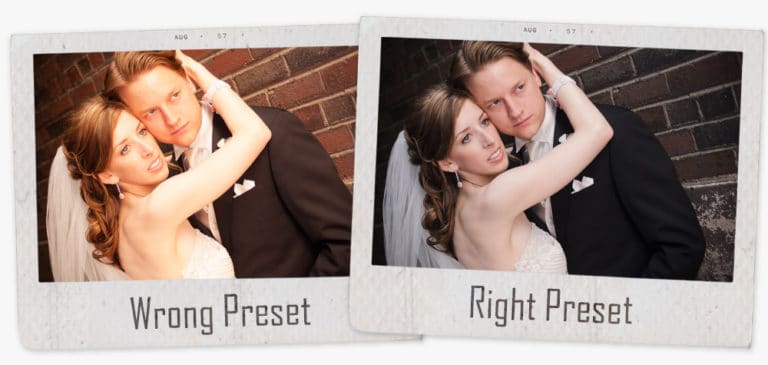
Have You Ever Downloaded Lightroom Presets, Applied & Thought – These Presets Suck!?!? Table of Contents So, you run across a website, Facebook, Pinterest or